MT5 broker checklist
Brokers for MetaTrader 5: a neutral checklist before you open an account
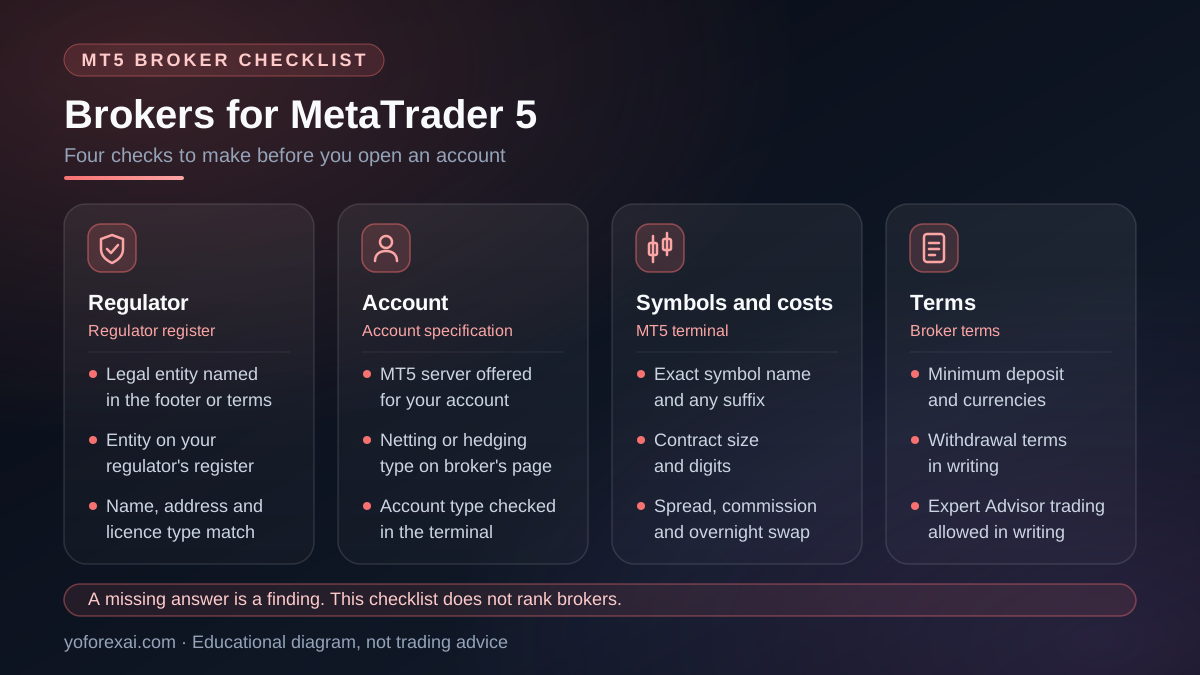
Brokers for MetaTrader 5 are firms that offer an MT5 trading server and accounts. They differ in regulation, account type, symbol details, costs and withdrawal terms. This checklist lists what to verify for each one. It names no broker and ranks none. YoForex AI does not recommend brokers.
Published · Updated · By YoForex AI Editorial Team
Brokers for MetaTrader 5 differ in regulation, account types, symbol details and costs, and those differences matter more than the marketing around them. This page is a neutral checklist. It names no broker, ranks none and does not call any of them the best. YoForex AI does not recommend brokers. Use the checks below to read each broker’s own documents, and treat what you find as something to verify, not a verdict.
Trading rules and the rules on who may offer trading services differ by country. Where a check below depends on where you live, the check says so. Confirm the rule with your own regulator before you open an account.
How should you use this checklist?
Work through the checks in order, and write down the answer to each one, the date you checked and the page where you found it. A broker’s marketing page is a starting point. The legal terms, the account specification and the regulator’s public register are the sources to rely on. If a check has no clear answer, record that as a finding. An unclear answer is a reason to ask more questions, not a reason to deposit.
Decide what you need before you compare any firm. List the symbols you plan to trade, such as XAUUSD or EURUSD, the account currency, the size of positions you expect to open and whether you intend to run an Expert Advisor. Those choices change which checks matter most. A discretionary trader who trades two pairs has different needs from someone who runs an automated program on gold.
Is the broker authorized by a regulator you can check?
Start with licensing. Confirm which regulator, if any, authorizes the legal entity that would hold your account. Find the legal entity named in the site’s footer or terms, then search for that same entity on your regulator’s public register. Match the company name, the address and the type of licence. A logo or a regulator’s name on a page is not enough on its own.
Public registers differ by country. For US derivatives firms, the National Futures Association runs BASIC, a free search tool. It lets you look up a firm or individual by name or NFA ID. The NFA notes that some entities also hold securities licences, and it points to FINRA’s BrokerCheck for that information. Many countries publish their own registers. Use the one that covers your country. If the entity you would deal with does not appear on any register that applies to you, treat that as a serious finding.
Read the licence as a fact about one legal entity. A broker group can hold several licences in different countries, and each licence covers only the entity and the services named in it. Ask which entity holds your account before you deposit.
Do brokers for MetaTrader 5 offer the right server and account type?
Confirm that the broker runs a MetaTrader 5 server and that the account you want is offered on it. Then check the margin mode. The MQL5 documentation on account information lists three margin modes an account can report: retail netting, retail hedging and exchange. The two retail modes matter most for most forex traders.
| Margin mode | Positions per symbol | Check before you open |
|---|---|---|
| Retail netting | Only one position per symbol can exist. | How a new order combines with an open position on the same symbol. |
| Retail hedging | Several positions per symbol are allowed. | How margin is calculated for offsetting positions, and whether your program expects them. |
The mode affects how a strategy behaves, not only how the account looks. A program that opens and closes positions on one symbol may act differently on a netting account than on a hedging account. Read the account type on the broker’s own page, then confirm it inside the terminal after you open the account.
What should you check in symbol specifications and costs?
Symbol specifications set the size of a contract, how prices are displayed and which trading rules apply. Two brokers can offer the same instrument under different names. One may list gold as XAUUSD, and another may add a suffix to the name. Compare the exact symbol you will trade, and do not assume that two names with the same letters describe the same contract.
Costs need the same care. Spreads, commissions and overnight swap all change the result of a trade. Some brokers quote a variable spread, others a fixed one. A commission may be charged per lot on each side of the trade. Overnight swap is charged on positions held past the broker’s rollover time, and it can be a charge or a credit. Ask for a worked example in writing, then calculate it yourself.
| Check | What to look for | How to verify |
|---|---|---|
| Symbol name | The exact spelling and any suffix on the server. | Find the symbol in the MT5 terminal connected to that broker’s server. |
| Contract size and digits | The values for the symbol you plan to trade. | Compare the broker’s published specification with what the terminal shows. |
| Spread and commission | Typical spread and any charge per lot. | Repeat the broker’s worked example with your own position size. |
| Overnight swap | The charge or credit for long and short positions. | Read the swap figures for your symbol in the broker’s documents, and test them on a demo account. |
How do minimum deposits and withdrawals work?
Check the minimum deposit, the currencies the account accepts and any fee on a deposit or withdrawal. Then read the withdrawal terms in full. Look for how long a withdrawal takes, whether money must go back by the same route it came in, and any rule about inactive accounts. The terms should also say what happens when a withdrawal is refused. If an answer is not in writing, ask for it in writing before you deposit.
Also check whether the broker offers negative-balance protection, and read the wording. Whether it applies depends on the broker and on your country.
Does the account allow automated trading?
MetaQuotes describes automated trading as the use of programs, called Expert Advisors, that run in the terminal and place trades based on preset algorithms. Not every account suits that use. Confirm in writing that the account you open allows an Expert Advisor to trade. Also read the broker’s rules on high-frequency or scalping activity, since some brokers restrict them.
If a program must run around the clock, check the hosting arrangements. A virtual private server placed near the broker’s trade server is one common option, and distance can affect the speed of orders. Confirm the arrangement with the broker and the hosting provider before you rely on it. Test any program on a demo account first, using the steps in how to install and test an EA in MT5.
For an overview of the Expert Advisor categories and how they are described, see the MT5 Expert Advisors overview. If you are comparing our own products, the Private EA page (our product) lists the requirements for that product. Check them against the account you are considering. YoForex AI does not choose the broker for you.
What this checklist cannot tell you
A checklist cannot tell you whether a broker will pay a withdrawal on time, whether its prices will hold during fast markets, or whether its finances are sound. A current licence confirms that a regulator authorized the firm. It does not guarantee the firm’s solvency, and a missing check mark does not prove a firm is dishonest. Some answers sit with the broker or the regulator, and you may need to ask them directly.
The checklist also cannot replace a test. Open a demo account on the same server, place the orders you plan to place and compare the fills with the quoted prices. For the demo side of this step, read what paper trading is. For a method to judge any Expert Advisor before you use it, see how to evaluate a forex EA.
Forex and margin trading can cause substantial losses. You can lose more than you deposit, depending on your broker and country. Read the broker’s terms and your regulator’s warnings before you open an account, and do not deposit money you cannot afford to lose.
Key takeaways
- Brokers for MetaTrader 5 differ in licence, account type, symbol details, costs and withdrawal terms. Check each one.
- Confirm the legal entity you would deal with and find it on your own regulator’s public register.
- Know whether the account uses retail netting or retail hedging before you test a strategy.
- Compare the exact symbol name, contract details, spreads, commissions and overnight swap in writing.
- Confirm in writing that the account allows automated trading, then test on a demo account.
- This checklist does not rank brokers. YoForex AI does not recommend brokers.
Frequently asked questions
Which broker is the best for MetaTrader 5?
No page can answer that for every trader. The right broker depends on your country, the instruments you trade, your costs and whether you run automated strategies. Apply the checks above to two or three firms, using the same criteria for each.
Does YoForex AI recommend a broker?
No. YoForex AI does not recommend brokers, and this page does not rank them. Our product pages describe our own requirements, which you should check against any account you consider.
Do I need a hedging account to run an Expert Advisor?
It depends on the program. Some are written for hedging accounts and others for netting accounts. Check the stated requirements of the specific program, then test it on a demo account before you use real money.
Is a regulator licence enough to trust a broker?
A licence is one check, not a guarantee. It confirms that a regulator authorized a firm, but it does not promise the firm’s finances, prices or service. Read the terms, confirm the entity you deal with and find out how complaints are handled.
Can I use MetaTrader 5 with any broker?
No. A broker must offer its own MT5 server and an account on it. Some brokers offer other platforms or only an older version. Confirm the platform on the broker’s own page, and check that your account appears in the terminal after you log in. If a program then fails to trade, the MT5 EA not trading guide lists the common causes to check.
Sources and verification
Primary-source links used for the platform behavior and risk statements in this guide. Sources reviewed 9 November 2026.
- MetaQuotes: Algorithmic Trading, Trading Robots · Reviewed
- MetaQuotes: Account Properties · Reviewed
- National Futures Association: BASIC · Reviewed