YoForex AI educational guides
How to evaluate a forex EA before relying on it
Backtesting trading results on historical data shows how an Expert Advisor behaved under fixed settings, not how it will perform live. Evaluate an EA by its documented behavior, account compatibility, reproducible test conditions, equity drawdown, total costs, and a separate forward test on a demo account. A high win rate or a profitable screenshot is not enough.
Published · Updated · By YoForex AI Editorial Team
First identify what the evidence actually shows
A backtest simulates a strategy on historical data. A demo forward test observes the software against incoming prices in a simulated account. A live record reflects a funded account under its actual execution conditions. These answer different questions and should be labeled separately. A marketing video or a screenshot is a demonstration unless the supporting record establishes more.
Record the EA version, preset file, instrument, timeframe, date range, account currency, starting balance, and broker environment. Ask for the full report rather than an isolated winning trade. Keep deposits and withdrawals separate from trading returns, and distinguish closed balance from equity that includes open positions.
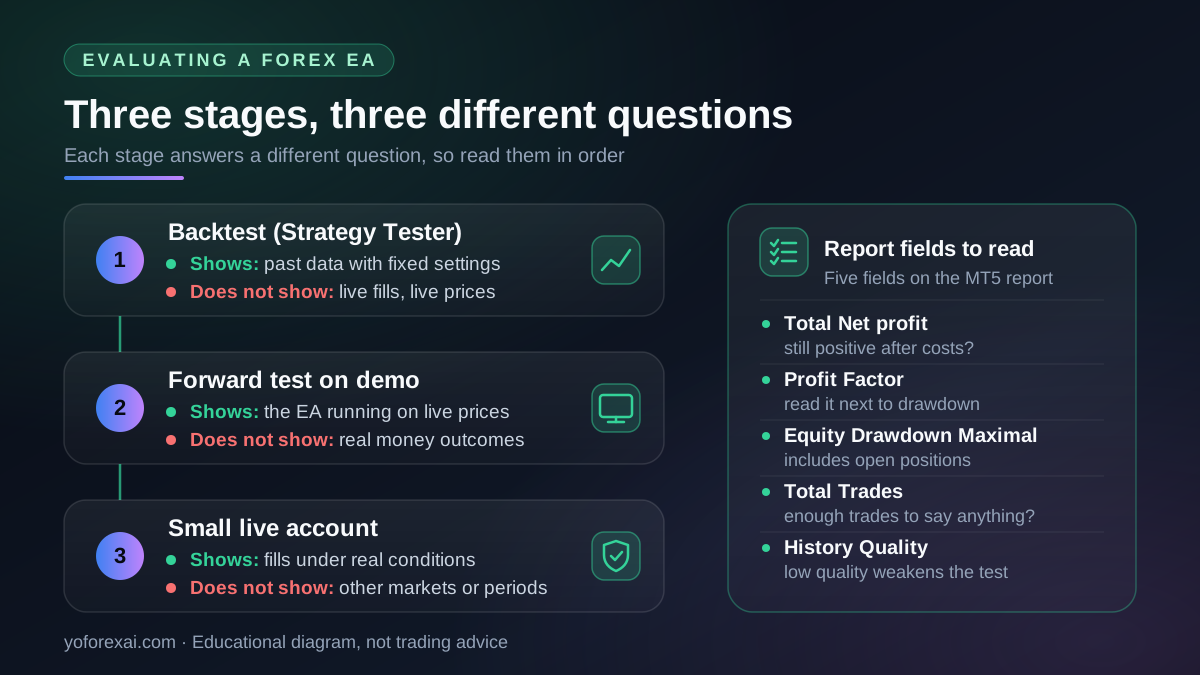
What should an MT5 backtest include?
MetaTrader 5's Strategy Tester can run an EA over historical data and evaluate different parameter settings. Its test configuration includes the instrument, period, modeling method, and execution assumptions. Review the official Strategy Tester documentation when reproducing a result.
The tester offers several tick-generation modes, and they do not produce the same evidence. “Every tick” simulates all ticks and is the slowest option. “Every tick based on real ticks” uses real ticks accumulated by the broker. “1 minute OHLC” emulates only four prices per one-minute bar. “Open prices only” uses only the open price. “Math calculations” generates no ticks and does not perform margin control, so treat it as a rough estimate only. Record which mode you used.
Commission and execution delay are set separately. In the Strategy Tester, commissions are configured under Advanced testing settings, where you choose the charging timing, the basis and the unit. Execution delay can be set to no delay, random delay or fixed delay, and according to the MetaQuotes page it applies only to the Expert Advisor's own trade requests. A result that omits these settings is not comparable with one that includes them.
Our evaluation checklist is to keep a saved copy of the tested settings, inspect the available data quality, and repeat the test on a separate period that was not used to select the settings. Record any changes between runs. A result that depends on one carefully selected period or an unexplained preset is harder to assess than a reproducible report.
Which metrics matter besides win rate?
| Evidence | Question it helps answer |
|---|---|
| Net result and costs | What remains after modeled or actual spreads, commissions, and financing? |
| Equity drawdown | How far did account equity fall, including open-position losses? |
| Trade count and date range | How much observation supports the claimed outcome? |
| Largest loss and losing sequence | What adverse behavior occurred within this record? |
| Position size and open exposure | Did sizing or the number of positions grow while losses accumulated? |
| Version and settings | Can another user reproduce the configuration being described? |
Inspect the complete report; a single metric leaves out important behavior.
Backtesting trading: how to read an MT5 backtest report
The MetaQuotes testing report reference defines the fields below. Match the labels against your own report before you compare results.
| Report field | What it means | What to check |
|---|---|---|
| Total Net profit | The financial result of all trades in the test. | Is it still positive after the commission and delay settings you recorded? Does it depend on a few trades? |
| Profit Factor | Gross Profit divided by Gross Loss. A value of 1 means they are equal. | A high value from a small number of trades is weak evidence. Read it next to the drawdown. |
| Balance Drawdown Maximal | The difference in deposit currency between the highest local balance and the next lowest balance. The MetaQuotes page says the percentage is given in brackets. | Could you have tolerated this loss in real money, not only on paper? |
| Equity Drawdown Maximal | The same measure calculated from equity, so open positions count. | This is usually the more demanding figure when positions are held through losses. |
| Total Trades | The number of trades that resulted in a profit or a loss. The report lists Total Deals separately. | Is the count large enough, across enough market conditions, to say anything? |
| History Quality | The percentage of correct one-minute data compared with incorrect data. The period is split into intervals, and quality is shown for each one. | Low or uneven quality means the result may reflect the data rather than the strategy. |
Drawdown is often the most informative field. A profit figure tells you where the test ended. Drawdown tells you how much the account had to absorb on the way. Compare the maximal equity drawdown with the position sizes and the number of simultaneous orders, because a drawdown that looks moderate can hide a position count that grows during losses.
Costs deserve their own check. The MetaQuotes testing report reference we reviewed does not list commission or spread as separate report fields, so record the commission and delay settings you used alongside the report. A profitable run with zero commission and no delay is a different test from one with your broker's actual costs.
History quality is the field most often skipped. If the report shows gaps or incorrect one-minute bars, the simulated fills may not match the market you intend to trade. Repeat the test with better data, or narrow the date range, before you draw a conclusion.
A backtest is not a forward test. A backtest fits a strategy to past data, and the settings may already reflect that data. A forward test runs the same settings on data that came after the test period. MetaQuotes describes forward testing as a rerun on a later, non-optimized period. Even a strong backtest tells you that the rules worked on the data you tested. It does not tell you that they will work on prices that have not happened yet.
How should a forward test on demo be run?
Set the parameters before the forward period begins and do not change them during the test. Record every trade, every rejected order and every error message. Note the broker, the server, the symbol specification and the account type. If you change a setting after a bad week, start a new record rather than merging the two.
A forward test answers a narrower question than a backtest. It shows whether the software places, manages and logs orders as documented under current prices and your own terminal. It does not show the profit or loss you would have made with real money. There is no universal length for a forward test. Judge it by the number of trades, the variety of market conditions it covered and whether the behavior matched the documentation.
Why can a high win rate still lose money?
Consider an illustrative sequence, not a YoForex result: nine wins of $10 and one loss of $100 produce a $10 loss before costs, despite winning nine of ten trades. Win frequency does not describe the size of losses. The timing and size of open exposure also matter, especially when multiple positions form a basket.
Likewise, a model's confidence number is not automatically a calibrated win probability. Ask how it was produced, which observations were tested, and whether the reported probability matched observed outcomes. If that evidence is missing, treat it as a model output requiring judgment.
Does hedging or a recovery system remove risk?
No. Opening an additional or opposing position changes exposure but does not erase previous losses, transaction costs, or margin requirements. Review when new positions are added, how position sizes are calculated, the maximum number of orders, and what happens if the intended exit is never reached.
For Dynamic Hedger EA and Private EA, examine the documented trade-management rules and version-specific controls. Do not assume that a setting called “recovery,” “protection,” or “trailing” guarantees a particular outcome.
Check compatibility before comparing results
Confirm the platform version, broker symbol, account type, account currency, contract size, and permitted trade sizes. Check whether the preset expects hedging or netting and whether cent-account displays could change how you interpret a monetary amount. Do not copy a balance or lot-size figure from a screenshot without checking those units.
Use the MT5 EA installation and testing guide, EA setup documentation, and Private EA version comparison for product-specific prerequisites. For a gold-focused MT5 EA, inspect the broker's exact XAUUSD or gold contract and compare the documented workflow on the Private EA V1.1 page. Start with a demo workflow that verifies installation, order permissions, logging, and the procedure for stopping new orders. Demo behavior does not establish future live returns.
What should make me pause?
Pause when a provider promises guaranteed returns, shows only selected winning trades, withholds drawdown or test conditions, or uses “AI” as a substitute for evidence. A claim that a system will reliably earn exceptional profits is not a test result, whatever the label. Check your own national regulator's current investor warnings about automated trading and AI trading tools, because rules and warning lists differ by country.
If you need a missing product specification or a fuller explanation of a demonstration, contact YoForex support. Separate the questions “does this software perform its documented task?” and “does this establish a future trading outcome?” The first can be tested; the second cannot be guaranteed.
Key takeaways
- A backtest shows how fixed settings behaved on past data. It is not evidence of live results.
- Record the tick-generation mode, commission, execution delay and history quality with every report.
- Read profit factor, total trades and drawdown together, and treat equity drawdown as the stricter figure.
- Run a forward test on demo with settings fixed in advance, and log every order and error.
- Be cautious of guaranteed-return claims and of results that show only selected trades.
Frequently asked questions
What does backtesting trading tell me about an EA?
It tells you how the EA's rules and settings would have behaved on a specific historical period, with specific costs and data. It can reveal drawdown, trade frequency and sensitivity to settings. It cannot tell you how the same EA will behave on future prices.
Is a high profit factor enough to trust an EA?
No. Profit factor is gross profit divided by gross loss. A high value from a few trades, or from one short period, is weak evidence. Check total trades, drawdown, history quality and whether the result holds on a separate period.
Why does my MT5 backtest differ from the live account?
Common causes include a different tick-generation mode, a different spread or commission, execution delay, requotes, a different symbol specification and broker data. Record each of these in both the test and the live log, so that the difference can be traced rather than guessed.
What is history quality in the MT5 Strategy Tester?
It is the percentage of correct one-minute data compared with incorrect data, shown per time interval in the testing report. The MetaQuotes page treats bars with volume 1 and differing OHLC values as incorrect, and counts history gaps as incorrect too. Low quality weakens any conclusion drawn from the test.
How long should a forward test on demo run?
There is no universal length. Continue until the record includes enough trades and enough different market conditions to judge the documented behavior, and until you have checked every order against the rules. A short run can show that the software works, but it cannot show profitability.
Sources and verification
Primary-source links used for the platform behavior and risk statements in this guide. Sources reviewed 7 November 2026.
- MetaQuotes: Strategy Testing · Reviewed
- MetaQuotes: Testing Report · Reviewed